Forwarding Trip Related Emails to Tripsy
Tripsy PRO Feature: Forwarding emails requires an active subscription to Tripsy PRO or our Lifetime PRO purchase. You can find out more about Tripsy PRO here
A lot of your trip details come in the form of confirmation emails from airlines, hotels, restaurant bookings, etc, and rather than having to re-enter those details manually into Tripsy you can forward those reservations to Tripsy.
To set expectations, this is really designed for confirmation emails from travel providers and is less geared toward free-hand itineraries or notes. For those, our new Smart Import feature can help you turn things like itinerary PDFs and more into activities within Tripsy.
We've got two handy ways for you to forward your trip related emails to Tripsy and, where possible, have these turned into activities within your itinerary.
Your Unique Tripsy Email
When you first install Tripsy as a new user, you'll see our onboarding tile with one of the options being Forward a Reservation. Tapping this will show you your unique Tripsy email address, you can forward your reservations to this address without having to setup any additional emails.
Tapping Copy Email Address will copy your unique email to your clipboard; we'd recommend saving this as a contact so you can quickly forward emails to that saved contact.
You'll then be asked if you'd like to Enable Notifications, which is entirely optional but will send you notifications when a new activity has been created based on your forwarded emails as we detail below.

As of September 2026, we've now created a unique Tripsy email for everyone, even if you've had your account with us for years. We encourage everyone to use this method of forwarding, as it means you don't need to verify any additional email addresses.
[email protected]
You can forward your trip related emails to [email protected] from any email address you have associated with your Tripsy account. Existing Tripsy users will be used to this way of forwarding, and we have no plans to remove this feature.
What Happens When You Forward an Email
When we receive an email, there are two possible outcomes depending on the email in question; we'll either turn the email into an activity or add the email to your Tripsy account for you to link with a trip or an existing activity.
TIP: You can automate email forwarding with mail rules, and we’ve got some tips on how to use these here.
Reservations & Flight Confirmations
For common types of reservations (flights, hotels, trains, restaurants) we work with email parsing partners to attempt to turn those confirmation emails into the relevant activities within Tripsy.
We currently support over 1,000 different travel providers, with upwards of 50,000 templates for different reservations across those providers, and are working to add more as we see examples of different types of emails. For the best results, we recommend ensuring you're forwarding booking confirmations that clearly show the location and dates of your activity.
When activities are successfully parsed from an email we’ll first check the dates of the activities found within the email.
- If the dates of the activities found match an existing trip, we’ll add the relevant activities to that trip for you.
- If the dates don’t match a trip you already have within Tripsy, we’ll create a new trip based on the location found within the email.
Once the activities have been added to a trip, you’ll get an email confirmation to the email address you forwarded the original email from to confirm the activities have been added, and to which trip.
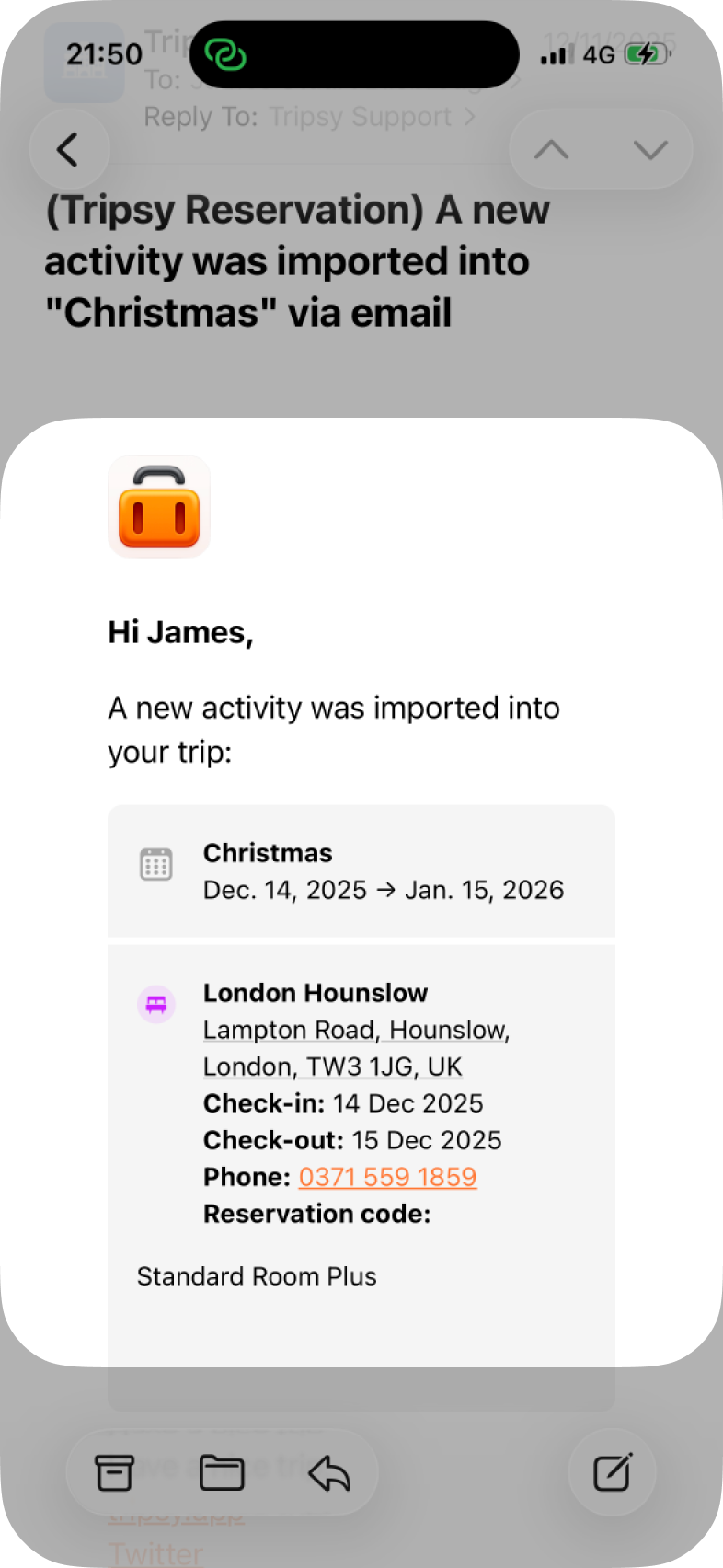
- If you have notifications turned on, you’ll also get a notification to advise new activities have been added.
- We’ll also attach the original email to the activity in question under the Documents section for that activity so you can refer back to it any time - which is helpful for things that may not be captured in the activity itself such as hotel WiFi information or parking details.
Emails That We Can’t Turn into Activities
For any emails that we can’t parse, such as emails that aren’t from a supported travel provider (e.g. a freehand email of your itinerary, or types of activity they can’t yet parse), we’ll add the email to your Tripsy account and let you know it’s available to assign to a trip or an activity.
- We’ll send you an email to let you know that there’s an email waiting to be handled.
- If you have notifications turned on, you’ll also get an alert from the Tripsy app to let you know there’s an email waiting for you to assign to a trip.
- When you open Tripsy, without following the notification, you’ll see a popup to review the emails.
- You can tap on each email to view that message and then tap Move to a Trip to move that specific email.
- Alternatively, tap Move to a Trip from the popup to move all pending emails to a trip.
- Any pending emails can also be seen within Settings > Forwarded Emails.
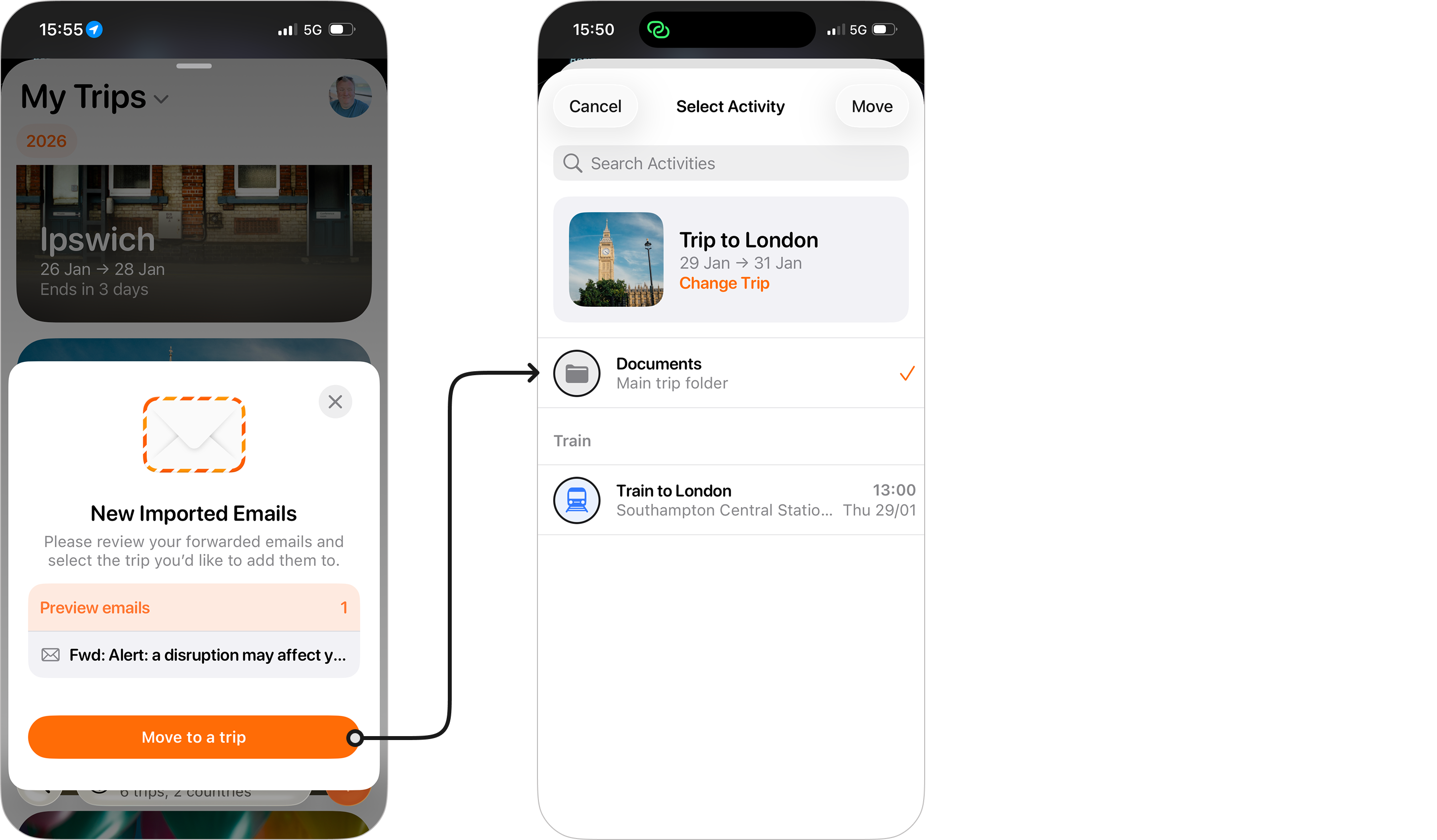
When you tap Move to a Trip you’ll be able to select which trip you’d like to move the email to, with Tripsy automatically selecting your current or first upcoming trip. You can choose to put the email in question into either:
- The Documents folder for the trip itself (which is handy for things like travel insurance, or whole trip itineraries from a travel agent).
- Or add the email to a specific activity within that trip (this works well for things like restaurant menus, train delay emails, etc.).
Other Ways to Handle Emails We Can't Parse
We understand it's frustrating when an email can't be turned into an activity, and so we've got a few additional ways for you to get those emails and documents into Tripsy.
Use Smart Import
For our PRO customers, our Smart Import feature can take documents, links from social media, Google Maps lists, and much more and turn these into activities for you. You can even use this to login to your travel provider's site and get the booking details.
Using AI Tools like ChatGPT, Claude, etc.
Whilst not everyone will want to entrust their travel plans to AI tools, we have now made possible for all our customers to optionally connect your favourite AI tools, e.g. Claude, to Tripsy and we've seen some good results with these tools reading a PDF from travel agencies and turning these into a full trip within Tripsy.
Of course, as with any AI tool, we encourage you to check the results and give your AI tool clear instructions on what you want it to do. For example, if you have a particular category that you want an activity to be saved as, make sure you tell your AI tool to do this when writing your prompt.
Making Sure Activities Get Created in the Right Trip
If you've got multiple trips happening at once, for example you could have a two day trip with different guests in the middle of a longer trip, or have trips with overlapping dates, you'll want to make sure that you create your trips with the specific date ranges and trip names before you forward emails for those specific trips.
Tripsy will use the dates provided during email parsing and will try to match activities to the trip with the closest matching dates. Of course, if something ends up in the wrong trip, you can always move this to the correct trip as we detail here.
Tips for Different Providers
Over the years, we've encountered a lot of different emails and so we've collected a few tips to help you with some of the more common issues we've seen with different providers:
- Trainline: Make sure you're forwarding the "Your booking confirmation..." email rather than the "Your etickets to..." emails. The booking confirmation has all of the correct timings that should ensure these train journeys get picked up correctly.
- AirBnB: Some hosts won't provide the address of your rental until closer to your booking, without an address in the reservation email we can't process these reservations.
Frequently Asked Questions
- The email I sent from a travel provider wasn’t parsed correctly, or not at all, what should I do?
- We appreciate this can be frustrating, so please do drop us an email to [email protected] or via the Talk to Us option within Settings within Tripsy. We’ll investigate how the email was parsed and can often work with our email parsing partners to resolve issues.
- Can other guests in my trip forward emails?
- Yes! Anyone who has ‘Collaborator’ access to your trip and has Tripsy PRO can forward emails to the same [email protected] address. It’s important to make sure you include any of their travel dates in the trip dates so their activities can be added to the right trip.
- Can people who aren't guests forward emails to my trips?
- If you're using a unique Tripsy email address then you can receive emails to that address from any other email address. This can be handy if your travel provider lets you CC another address into reservation and confirmation emails, for example.
- Can Tripsy automatically scan my emails for activities without me having to forward them?
- The short answer, for now, is no. We don't connect to your email accounts to scan emails. We do this to maintain your privacy, by having you forward the emails, or setup mail rules to forward them, you control what emails get parsed into Tripsy.
- We are investigating how we can let you import emails from the local Mail app on iOS, iPadOS, and macOS using Apple Intelligence on supported devices. We don't have anything to announce at this time, but do keep an eye on our blog for details as they become available.