Can I Share My Tripsy PRO Benefits? (Family Sharing)
If you frequently travel with your family, we're pleased to say that we have dedicated Family Sharing subscriptions and lifetime unlocks of Tripsy PRO, so you can travel with your family and they can use all the PRO features of Tripsy at no extra cost.
When you're ready to get all the great features of Tripsy PRO, you'll be able to choose if you'd like to include Family Sharing, or if you're a solo traveller you can save with our Individual options

To avoid any confusion, it's important to note that the Family Sharing feature only applies to your subscription or lifetime purchase, it does not automatically share your trips with others in your Apple Family plan.
To share your trips with others you can follow our guide here. You can also use our 'Favorite Guests' feature to make sure your family are added to your trips automatically
You'll need to be running at least iOS 14.2 or newer to use Family Sharing, and you can set this up through your Apple ID by following the steps here: https://support.apple.com/en-us/HT201088
Subscriptions (Annual or Monthly)
We offer both an Individual and Family version of our annual subscription and when you subscribe to Tripsy PRO, you'll be shown if Family Sharing is included with the subscription in question before subscribing as you can see from our examples here:

For new subscriptions, where Family Sharing is included, this should be activated automatically.
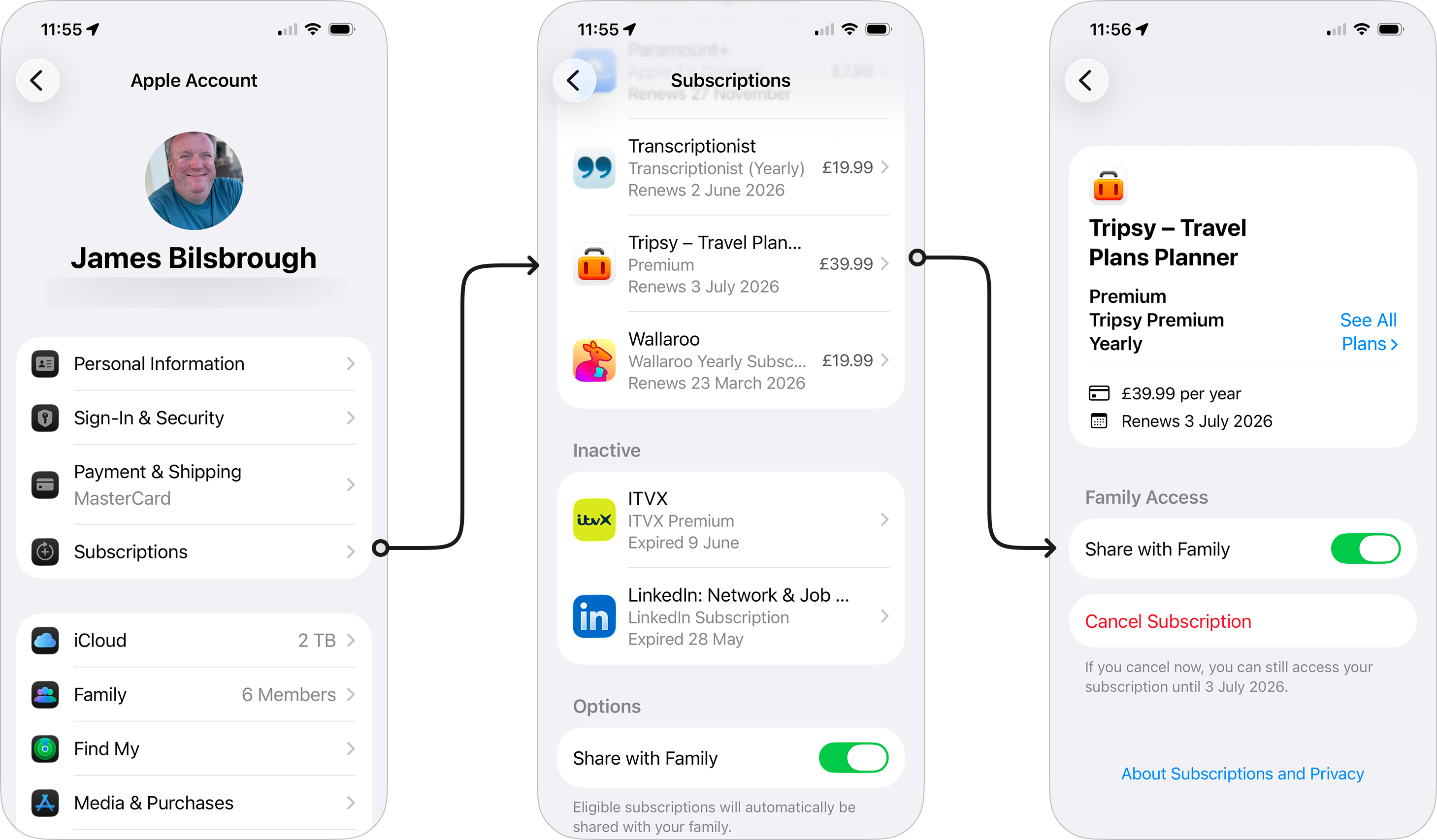
However, for existing subscribers, who subscribed to Tripsy before Family Sharing was available, you may need to enable Family Sharing for your Tripsy subscription by following these steps:
- Open the Settings app on your iPhone or iPad, or System Settings on Mac.
- Open your Apple Account settings by tapping on your name where it says Apple Account
- Open your subscription options:
- On iPhone and iPad this is under just Subscriptions.
- On Mac this will be under Media & Purchases and you'll click Manage to the right of Subscriptions.
- Locate Tripsy in your list and tap to go to the settings
- Make sure that Share with Family is enabled.
Lifetime PRO (In-App-Purchase or via our website)
We now offer both a Individual and Family Sharing purchase for Lifetime PRO through the App Store, whereas our website currently offers just the Family Sharing enabled version. Please be aware if you purchased through the App Store:
- Customers who purchased Lifetime PRO before April 2026, you automatically have our Family Sharing version.
- Customers who purchased Lifetime PRO after April 2026, you will have chosen either Individual or Family.
If you do have our Family Sharing version of Lifetime PRO, it's important to note that this is not treated as a subscription as it's an in-app-purchase, this means you will not see Tripsy in your Subscriptions list, but if you purchase through the App Store it will be in your purchase history.
This also means that Lifetime PRO is shared in a differently way to a subscription; each person you want to share your Tripsy PRO benefits with must also have Purchase Sharing turned on for their Apple Account within your Family Sharing plan, this cannot just be the person sharing the purchase. Please be aware that this may change how purchases are made through the App Store, as Apple detail here.
If you're still having some trouble:
- Make sure that the Apple Account you used to purchase Lifetime PRO, or the account you used to redeem the App Store code if you bought via our website, is the same account you're using for Family Sharing. That's particularly important if you have Apple accounts in different regions.
- If you've had to enable Purchase Sharing, you may need to go to Settings > Your Membership within Tripsy and then tap Restore Purchases for Tripsy to recognise the in-app-purchase.
- You may need to have your family member re-download Tripsy after the Lifetime PRO purchase has been made, and it's best to have them do this as follows:
- Uninstall Tripsy if it's already installed.
- Go into the App Store
- Tap their profile picture or initials in the top right of the screen.
- Tap Apps
- Tap the name of the person sharing the app, for example yourself.
- Find Tripsy in the list
- Tap the download button from in this list.